
GitLab.com & Self-hosted GitLab CI
Blazing fast GitLab CIwithout the complexity.
Secure, ephemeral Firecracker microVMs for every job. No Kubernetes to manage. No Docker In Docker security nightmares. Just fast, isolated builds on your own infrastructure.
Faster Builds
Bare-metal performance with builds typically 2-3x faster than hosted runners.
No K8s to Manage
No Helm charts, no Kubernetes clusters. Just install our agent on bare-metal or VMs.
No DIND Nightmares
Run Docker natively in each microVM. No privileged containers, no socket binding.
Instant Boot
VMs boot and start running jobs in under 1 second. Faster than Kubernetes pod scheduling.
Two supported modes
Whether you use GitLab.com or run GitLab on your own infrastructure, Actuated has you covered.
GitLab.com
Connect your own servers as runners for GitLab.com projects. Get bare-metal speed with the convenience of GitLab's hosted platform.
- Bring your own bare-metal or cloud servers
- Full isolation between jobs
- No changes to your existing pipelines
GitLab CI (Self-hosted)
Run Actuated alongside your self-hosted GitLab instance. Full control over your CI infrastructure with enterprise-grade isolation.
- On-premises or cloud hosted GitLab
- Private peering for firewalled networks
- Docker and Shell executors supported
How it works
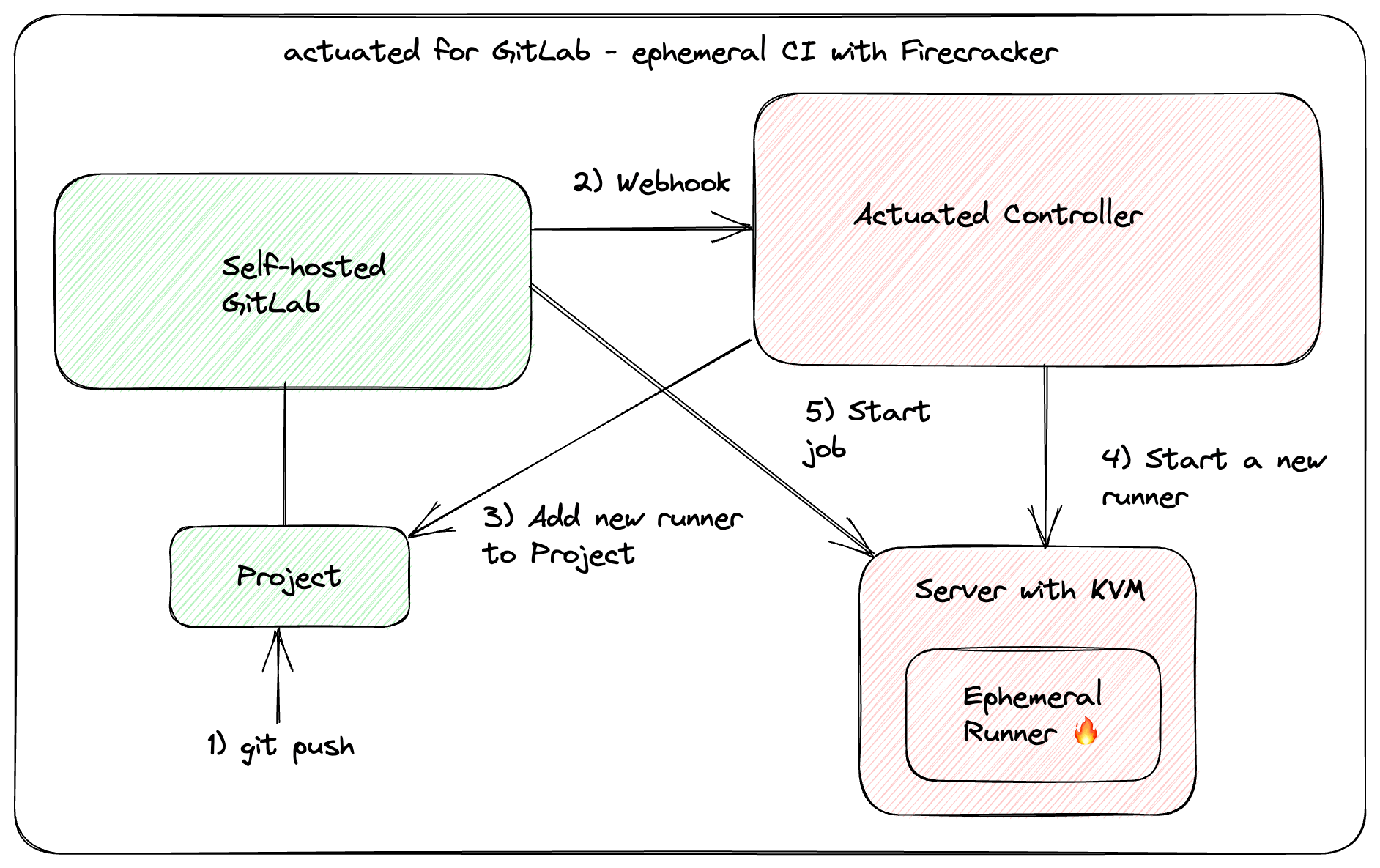
When a pipeline is triggered, the Actuated control plane launches a dedicated Firecracker microVM for every job. The VM boots in under a second, runs the job, then is destroyed completely.
- Pipeline triggered
- A commit, merge request, or manual trigger starts the pipeline.
- MicroVM boots instantly
- A fresh Firecracker microVM spins up and registers as a runner in under 1 second.
- Job runs with full isolation
- sudo, Docker, Kubernetes - everything works out of the box with KVM-level security.
- VM destroyed
- No side effects, no leakage between jobs. Every build starts completely fresh.

Security notice displayed by the GitLab Helm chart warning against Docker in Docker.
Say goodbye to DIND
Docker-in-Docker (DIND) requires privileged mode. The GitLab Helm chart disables it by default for good reason - it's a significant security risk.
With Actuated, Docker runs natively inside each microVM. No privileged containers, no socket binding from the host, no flakey VFS driver. No need to switch to Kaniko, Buildah, or fight with user namespaces.
You get sudo, a fresh Docker engine, and systemd in every VM - things like Kubernetes work out of the box for E2E testing.
Everything you need for GitLab CI
Simple to configure
Add the actuated tag to any job. Size VMs per-job with tags like actuated-4cpu-8gb. No predefined sizes - pick any combination of vCPU and RAM.
Switch between Docker and Shell executors per-job by adding the shell tag. The Shell executor gives you full VM access - perfect for running KinD or K3s clusters for E2E testing.
.gitlab-ci.yml
build:
  image: docker:latest
  script:
    - docker build -t myapp .
    - docker push myapp
  tags:
    - actuated-4cpu-8gb

test-e2e:
  script:
    - k3sup install --local
    - kubectl apply -f ./manifests
    - ./run-tests.sh
  tags:
    - actuated-8cpu-16gb
    - shell
See it in action
Watch Actuated launch parallel GitLab CI jobs in dedicated Firecracker microVMs - each booting in under a second.
Demo: Actuated for GitLab CI
Here's 3x @GitLab CI jobs running in parallel within the same Pipeline demoed by @alexellisuk
— actuated (@selfactuated) June 13, 2023
All in their own ephemeral VM powered by Firecracker#cicd #secure #isolation #microvm #baremetal pic.twitter.com/fe5HaxMsGB
Run anywhere with KVM support
Actuated works with bare-metal servers and nested virtualisation across all major providers.
AWS
EC2 bare-metal or nested virtualisation
Azure
Bare-metal or nested virtualisation
GCP
Bare-metal or nested virtualisation
OpenStack
KVM-enabled instances
VMware
Nested virtualisation support
On-premises
Your own data centre hardware
Bare-metal
Dedicated servers from any provider
Private peering for enterprise
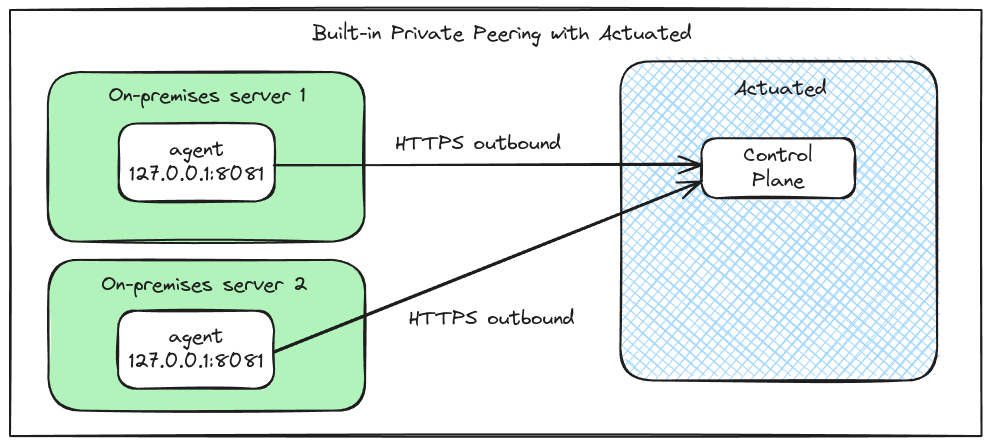
Servers behind a private network? Enable peering for an outbound connection that passes through firewalls, NAT, HTTP Proxies and VPNs without additional configuration.
- No additional networking or firewall changes
- Agent only accessible to the Actuated control-plane
- All traffic encrypted with TLS
Learn more
July 2024
Secure your GitLab jobs with microVMs and Actuated
Feature overview including mixed executors, VM sizing, private peering, and how microVMs provide more flexibility and security for CI workloads.
June 2023
Secure CI for GitLab with Firecracker microVMs
The original announcement for Actuated for GitLab CI, including a video demo and details on why Firecracker provides the isolation CI needs.